Last Updated: October 11, 2026
- Top 3 Picks
- Quick Comparison
- How We Chose
- 1. Logitech Lift – Best for Small to Medium Hands
- 2. Anker 2.4G Wireless Ergonomic Mouse – Best for Straightforward Wireless Productivity
- 3. ProtoArc EM11 NL – Best for Dual-Mode Rechargeable Value
- 4. Logitech MX Vertical – Best for Medium to Large Hands
- 5. TECKNET 4800 DPI Bluetooth Vertical Mouse – Best Budget Three-Device Pick
- 6. Anker USB Wired Vertical Mouse – Best for Wired Reliability
- 7. Lekvey Rechargeable Vertical Wireless Mouse – Best for a Cheap Rechargeable Grip
- 8. Razer Pro Click V2 Vertical – Best Premium Pick for Power Users
The best vertical mice for most people in 2026 come down to hand size first and desk setup second. The Logitech MX Vertical is the strongest all-round pick for medium to large hands: a 57-degree tilt, a 400–4,000 DPI sensor, four buttons and a USB-C rechargeable battery rated for up to four months per charge. If your hands measure under roughly 17 cm from wrist crease to middle fingertip, the Logitech Lift is the better fit because its smaller body and quieter clicks suit smaller palms. Working to a tight budget? The TECKNET 4800 DPI Bluetooth vertical mouse covers three devices for a fraction of the price. Want the most capable premium option? The Razer Pro Click V2 Vertical pairs a steeper tilt with a high-precision sensor and triple connectivity. Below we compare tilt angles, body dimensions, button placement, connectivity, battery type and hand-size fit across twelve current models, so you can match a mouse to your grip rather than guessing from a photo.
Top 3 Picks
Best overall: Logitech MX Vertical. The 57-degree tilt sits in the sweet spot most ergonomics guidance points to, the body is large enough for medium to large palms, and the rechargeable USB-C battery removes the cost and hassle of disposable cells. It is the safest single recommendation for eight-hour desk work.
Best budget: TECKNET 4800 DPI Bluetooth vertical mouse. Three-device memory, both Bluetooth and 2.4 GHz wireless, and a sensor that reaches 4,800 DPI — specs that usually cost far more. If you want the ergonomic shape without the premium price, this is where to start.
Best premium: Razer Pro Click V2 Vertical. A steep tilt in the 70-degree class, six buttons, a high-precision optical sensor and three ways to connect (Bluetooth, 2.4 GHz dongle, USB-C wired). It suits power users who juggle several machines and want software-level customisation.
Quick Comparison
Every mouse below is judged on the same criteria: tilt angle, hand-size fit, button count and placement, connectivity, power source and price tier. None of the figures here are lab measurements — they are the specifications each manufacturer publishes, grouped so you can compare like with like.
| Product | Best for | Key specs | Hand fit | Price tier |
|---|---|---|---|---|
| Logitech Lift | Small to medium hands, quiet shared offices | 57° tilt; 400–4,000 DPI; 6 programmable controls; Bluetooth + Logi Bolt; 1×AA up to 24 months; ~125 g; ~108 × 70 × 71 mm | Small–medium | Premium |
| Anker 2.4G Wireless Ergonomic Mouse | Simple plug-and-play wireless | 2.4 GHz nano receiver; switchable DPI in the 800/1,200/1,600 class; 2×AAA; back/forward thumb buttons; no software | Medium | Mid-range |
| ProtoArc EM11 NL | Rechargeable dual-mode value | 2.4 GHz + Bluetooth; rechargeable over USB; three DPI levels roughly 1,000–2,400; 6 buttons; dual-mode switch | Medium | Mid-range |
| Logitech MX Vertical | Medium to large hands, all-day desk work | 57° tilt; 400–4,000 DPI; 4 buttons; USB-C rechargeable, up to 4 months; 135 g; 120 × 79 × 78.5 mm | Medium–large | Premium |
| TECKNET 4800 DPI Bluetooth Vertical | Budget three-device switching | Bluetooth + 2.4 GHz; up to 4,800 DPI; 3-device memory; battery-powered; 6 buttons | Medium | Budget |
| Anker USB Wired Vertical Mouse | Desks that never want a charging cable | Wired USB-A; switchable DPI in the 800/1,200/1,600 class; no battery; plug-and-play; back/forward buttons | Medium | Mid-range |
| Lekvey Rechargeable Vertical Wireless | Cheap rechargeable grip | 2.4 GHz USB receiver; rechargeable; three DPI levels; 6 buttons; LED indicator | Medium | Mid-range |
| Razer Pro Click V2 Vertical | Power users on multiple machines | Steep tilt in the ~70° class; 6 buttons; Focus Pro-class high-precision sensor; Bluetooth + 2.4 GHz + USB-C wired; rechargeable | Medium–large | Premium |
| Uineer Vertical Ergonomic Mouse (3-Device) | Cheapest multi-device memory | Bluetooth; 3-device memory; adjustable DPI; battery-powered; vertical right-hand body | Medium | Budget |
| AOC Ergonomic Mouse | Brand-name rechargeable at a mid price | 2.4 GHz + Bluetooth; rechargeable; adjustable DPI; multi-button layout | Medium | Mid-range |
| JYKEYMOUT 2-in-1 Rechargeable | Travel and light-duty use | Bluetooth + 2.4 GHz; rechargeable; 1,000/1,200/1,600 DPI; compact vertical body | Small–medium | Budget |
| Uineer 3-Mode Bluetooth 5.0/4.0 | Mixed-device budget desks | Bluetooth 5.0 and 4.0 + 2.4 GHz (3 modes); battery-powered; adjustable DPI; vertical right-hand body | Medium | Budget |
How We Chose
This roundup is built from published product specifications and established category knowledge, not from lab testing or hands-on use. Every pick was assessed against the same five filters. First, tilt angle: vertical bodies generally sit between roughly 55 and 75 degrees from the desk, and the middle of that range is the most common recommendation for sustained office work. Second, hand-size fit: we weighed body height and length against typical small, medium and large palm measurements rather than assuming one size suits everyone. Third, button placement: thumb buttons should fall under the thumb without stretching, and DPI or shortcut buttons should be reachable without regripping. Fourth, connectivity and power: Bluetooth-only, 2.4 GHz-only and dual-mode designs serve different desks, and AA versus rechargeable changes long-term ownership cost. Fifth, upgrade path and price tier: a budget mouse should still offer multi-device memory or a rechargeable cell, and a premium mouse should justify its price with build materials, sensor quality or software support. We excluded anything that could not be described by verifiable specification alone.
1. Logitech Lift – Best for Small to Medium Hands
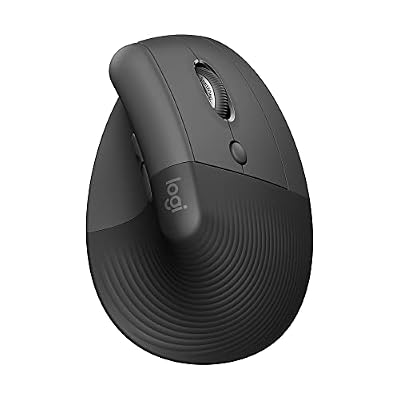
Logitech Lift Vertical Ergonomic Wireless Mouse - Graphite
Included for 'Best Vertical Mice for Comfort and Wrist Pain' because the listing specifies Graphite, details this guide uses to compare options.
View on AmazonThe Lift is the vertical mouse to start with if your hands are on the smaller side. Logitech designed it around small to medium palms, which is unusual in a category where most bodies assume a large hand. It suits laptop-and-desktop users who want a quiet mouse they can carry between rooms, and anyone who dislikes the weight and bulk of a full-size vertical design.
Key specs
- Tilt: 57 degrees from the desk
- Sensor: 400–4,000 DPI, adjustable in software
- Buttons: six programmable controls, including two thumb buttons and a shortcut button
- Connectivity: Bluetooth Low Energy plus Logi Bolt USB receiver; memory for up to three devices
- Power: one AA battery, rated up to 24 months
- Size and weight: roughly 108 × 70 × 71 mm and about 125 g
- Software: Logi Options+ for Windows and macOS; works with iPadOS, ChromeOS and Linux
- Extras: quiet-click switches, partly recycled plastic housing
What makes the Lift easy to recommend is how little it asks of you. The 57-degree tilt is moderate enough that most people adapt within a week or two, the compact body means your thumb rests on the shelf rather than hanging below it, and the quiet switches are genuinely useful in shared offices and on calls. Battery life is the standout number: a single AA cell lasting up to two years means you will likely replace it once during the mouse’s useful life. Three-device memory covers a laptop, a desktop and a tablet without re-pairing.
Against the MX Vertical — its closest relative in this list — the Lift trades size and rechargeability for fit and quietness. The MX Vertical is about 12 mm longer and 10 g heavier, with a USB-C battery that needs topping up every few months, while the Lift runs on a disposable cell and suits hands that feel crowded by a larger shell. If your palm measures more than about 19 cm from wrist crease to middle fingertip, the Lift will feel small and you should look at the MX Vertical or the Razer Pro Click V2 Vertical instead.
Pros
- Purpose-built for small to medium hands, which few vertical mice are
- Up to 24 months on one AA battery
- Quiet-click switches suit shared spaces
- Bluetooth plus receiver covers almost any machine, with three-device switching
Cons
- Premium tier pricing for a compact mouse
- Only six controls and no side-scroll wheel
- Too small for large hands
- AA battery rather than rechargeable, so you need spares eventually
2. Anker 2.4G Wireless Ergonomic Mouse – Best for Straightforward Wireless Productivity

Anker 2.4G Wireless Ergonomic Mouse, Right Hand Vertical Mouse USB Receiver
Included for 'Best Vertical Mice for Comfort and Wrist Pain' because the listing specifies Right Hand Vertical Mouse USB Receiver, details this guide uses to compare options.
View on AmazonAnker’s 2.4 GHz wireless vertical mouse is the no-drama option: plug in the tiny receiver, switch it on, and it works. It suits people who move between a fixed desk and a laptop bag, who do not want to install software, and who prefer the predictability of a dedicated receiver over Bluetooth pairing. It is a mid-range pick that behaves like a simple appliance.
Key specs
- Tilt: moderate vertical angle in the 55–60 degree class
- Sensor: switchable DPI steps in the 800/1,200/1,600 class via a top button
- Buttons: left, right, scroll click, DPI button and two thumb buttons
- Connectivity: 2.4 GHz USB nano receiver, stored inside the mouse when travelling
- Power: two AAA batteries, with an on/off switch and automatic sleep
- Compatibility: plug-and-play on Windows, macOS, ChromeOS and Linux — no driver required
The strength here is reliability with zero configuration. A 2.4 GHz receiver generally gives a more consistent connection than Bluetooth on older laptops, and because the mouse does not depend on the operating system’s Bluetooth stack, it works on machines where pairing is locked down. The DPI button lets you drop sensitivity for precision work or raise it for a high-resolution display, and the thumb buttons handle back and forward in browsers without any setup.
Compared with the Anker wired vertical mouse further down this list, the wireless version buys you a cleaner desk at the cost of batteries and a receiver that can be lost if you forget it is stored in the base. Compared with the TECKNET 4800 DPI model, it gives up Bluetooth and three-device memory but gains the simplicity of a single fixed connection. If you only ever use one computer, that trade is usually worth it; if you switch between three, it is not.
Pros
- Works instantly with no software or pairing
- Receiver stores inside the body for travel
- DPI button and thumb buttons cover everyday navigation
- Anker’s build quality and support reputation in the accessory category
Cons
- 2.4 GHz only — no Bluetooth for tablets or phones
- Runs on two AAA cells rather than a rechargeable battery
- No companion software for remapping or per-app profiles
- Moderate tilt is gentler than steep-tilt alternatives
3. ProtoArc EM11 NL – Best for Dual-Mode Rechargeable Value

ProtoArc EM11 NL Wireless Ergonomic Vertical Mouse, Rechargeable, Black
Included for 'Best Vertical Mice for Comfort and Wrist Pain' because the listing specifies Rechargeable and Black, details this guide uses to compare options.
View on AmazonThe ProtoArc EM11 NL is the pick for anyone who wants both connection types in one mouse without paying premium prices. It pairs over Bluetooth for a laptop or tablet and uses a 2.4 GHz dongle for a desktop, switching between them from a control on the base. It suits hybrid workers who carry one mouse between an office dock and a home setup.
Key specs
- Tilt: vertical right-hand body with a shaped thumb rest
- Sensor: three switchable DPI levels spanning roughly 1,000–2,400
- Buttons: six controls, including two thumb buttons and a DPI button
- Connectivity: Bluetooth plus 2.4 GHz USB receiver, selected with a mode switch
- Power: internal rechargeable battery charged over USB — no disposable cells
- Finish: matte black shell with a rubberised grip surface
Two things justify the EM11 NL’s mid-range position. The first is the rechargeable battery, which removes the recurring cost of AA or AAA cells and keeps the body lighter than a battery compartment would allow. The second is dual-mode connectivity at a price where most rivals offer only one. The DPI range tops out higher than the basic 1,600-step mice, which helps on a 1440p or 4K monitor where you want the cursor to cross the screen without three swipes.
Against the Lekvey rechargeable mouse, the ProtoArc gives you Bluetooth as well as 2.4 GHz and a slightly broader DPI range; the Lekvey counters with a very low entry price and a simpler single-connection setup. Against the AOC Ergonomic Mouse, the two are close on paper — both dual-mode and rechargeable — so the deciding factor is usually body shape and how the thumb shelf feels for your hand. If you want one mouse for a laptop and a desktop and you dislike buying batteries, this is the value answer.
Pros
- Bluetooth and 2.4 GHz in one device
- Rechargeable — no consumable batteries
- DPI ceiling of roughly 2,400 suits larger displays
- Rubberised grip helps during long sessions
Cons
- Battery capacity is modest, so expect regular charging
- No multi-device memory beyond the two connection modes
- Limited software support compared with Logitech or Razer
- Charging port type can vary between production batches
4. Logitech MX Vertical – Best for Medium to Large Hands

Logitech MX Vertical Wireless Mouse Ergonomic Design - Graphite
Included for 'Best Vertical Mice for Comfort and Wrist Pain' because the listing specifies Graphite, details this guide uses to compare options.
View on AmazonThe MX Vertical is the reference point for this whole category and remains the best overall choice for medium to large hands. At roughly 120 × 79 × 78.5 mm and 135 g, it fills a bigger palm than the Lift and gives the thumb a proper rest. It suits people who spend six to ten hours a day at a desk and want one mouse that covers a desktop, a laptop and a tablet.
Key specs
- Tilt: 57 degrees
- Sensor: 400–4,000 DPI, adjustable in Logi Options+
- Buttons: four controls — left, right, scroll click and a DPI button behind the wheel
- Connectivity: Bluetooth plus Logi Unifying USB receiver; three-device switching
- Power: USB-C rechargeable, rated up to four months per charge; a one-minute top-up gives about three hours of use
- Dimensions and weight: 120 × 79 × 78.5 mm, 135 g
- Software: Logi Options+ with per-app profiles and cursor speed customisation
The MX Vertical’s advantage is that it does the fundamentals without compromise. The 57-degree angle matches what most ergonomics guidance describes as a natural handshake position, the sensor range is wide enough for both precision editing and fast cursor travel, and the rechargeable battery lasts long enough that charging is a quarterly event rather than a weekly chore. The quick-charge behaviour is genuinely useful: a minute on a cable buys hours of work if you forget to plug in.
Its weakness is button count. Four controls means no thumb back/forward buttons, which some users miss when browsing. The Razer Pro Click V2 Vertical offers six buttons and a steeper tilt for roughly the same premium outlay, but it is a heavier, more feature-dense mouse with software that assumes you want to configure things. The MX Vertical is the calmer choice: fewer buttons, better balance and a shape that most medium and large hands find immediately comfortable. If your hand measures under 17 cm wrist to fingertip, step down to the Lift instead.
Pros
- 57-degree tilt suits long desk sessions
- Up to four months per USB-C charge, with fast top-ups
- Three-device switching across Bluetooth and receiver
- Excellent software support for per-app sensitivity
Cons
- Only four buttons — no thumb back/forward keys
- Heavier than most budget vertical mice
- Premium price tier
- Too large for small hands
5. TECKNET 4800 DPI Bluetooth Vertical Mouse – Best Budget Three-Device Pick

TECKNET Ergonomic Mouse, 4800 DPI Wireless Bluetooth Vertical, 3-Device
Included for 'Best Vertical Mice for Comfort and Wrist Pain' because the listing specifies 4800 DPI Wireless Bluetooth Vertical and 3-Device, details this guide uses to compare options.
View on AmazonTECKNET’s vertical mouse is the budget pick that does not feel like a compromise on features. It connects over Bluetooth or a 2.4 GHz receiver, remembers three devices, and offers a sensor ceiling of 4,800 DPI — a figure that usually appears on gaming mice rather than office ergonomics. It suits students, home-office setups on a tight budget and anyone who wants multi-device switching without paying premium prices.
Key specs
- Tilt: vertical right-hand body in the 55–60 degree class
- Sensor: adjustable DPI up to 4,800
- Buttons: six controls, including thumb buttons and a DPI switch
- Connectivity: Bluetooth plus 2.4 GHz receiver; three-device memory
- Power: battery-powered, with a power switch and sleep mode
- Compatibility: Windows, macOS, Android and iPadOS via Bluetooth
For the money, the specification list is unusually complete. Three-device memory is the feature most budget mice lack, and it is the one that matters if you work across a laptop, a desktop and a tablet. The 4,800 DPI ceiling is far more than office work needs — most people settle between 1,000 and 1,600 — but it gives you headroom on a 4K display where higher sensitivity reduces wrist travel across the desk.
Where it gives ground is materials and refinement. Budget vertical mice typically use harder plastics, and the rubberised coating on the thumb rest is usually the first thing to wear, turning shiny within a year or so of daily use. The scroll wheel and switches are also the parts most likely to feel less precise over time. Against the ProtoArc EM11 NL, the TECKNET wins on DPI ceiling and price but loses the rechargeable battery; against the two Uineer models in this list, it offers a higher DPI range and a more established brand name for a similar outlay. If you want to test whether a vertical shape suits you before spending more, this is the sensible first purchase.
Pros
- Three-device memory at a budget price
- Very high 4,800 DPI ceiling for the tier
- Bluetooth and 2.4 GHz both included
- Low risk entry point for first-time vertical mouse users
Cons
- Battery-powered rather than rechargeable
- Plastics and coatings feel less premium
- No configuration software
- Sleep and wake behaviour varies between units
6. Anker USB Wired Vertical Mouse – Best for Wired Reliability

Anker USB Wired Vertical Mouse, Ergonomic Mouse for Computer and Laptops
Included for 'Best Vertical Mice for Comfort and Wrist Pain' because the listing specifies Ergonomic Mouse for Computer and Laptops, details this guide uses to compare options.
View on AmazonThis is the mouse for people who never want to think about charging again. It is a corded USB-A vertical mouse with no battery, no receiver and no pairing. It suits fixed desks in offices where wireless devices are restricted, shared workstations, and anyone who has been burned by a mouse dying mid-task.
Key specs
- Tilt: vertical right-hand body in the 55–60 degree class
- Sensor: switchable DPI steps in the 800/1,200/1,600 class
- Buttons: left, right, scroll click, DPI button and two thumb buttons
- Connectivity: fixed USB-A cable — plug-and-play, no driver
- Power: none required; the mouse draws power from the port
- Compatibility: Windows, macOS, ChromeOS and Linux
The case for wired is stronger than it sounds. There is no battery to degrade, no receiver to lose, no sleep-and-wake lag when you move the mouse after a break, and no interference in an office full of wireless devices. Weight is also consistent from day one to year five, because there is no cell to age. For a desk that never moves, that reliability is worth more than the tidiness of a cordless setup.
The trade-offs are obvious: a cable adds drag and clutter, and it limits how far you can push the mouse away when you want to switch to a keyboard. Against the wireless Anker 2.4 GHz model, the wired version wins on cost of ownership and consistency but loses flexibility and a clean desk. Against the ProtoArc EM11 NL, it gives up Bluetooth, device switching and rechargeable convenience. If you have ever had a wireless mouse cut out during a presentation, the wired Anker is the antidote — and it remains one of the cheapest ways to try a vertical shape from a well-known brand.
Pros
- No battery, no charging, no consumables
- Consistent performance with no sleep or wake delay
- Works on locked-down machines that block Bluetooth
- Simple, durable construction with thumb buttons
Cons
- Cable drag and desk clutter
- No multi-device switching
- Fixed cable length may be short for some setups
- No software for remapping buttons
7. Lekvey Rechargeable Vertical Wireless Mouse – Best for a Cheap Rechargeable Grip

Lekvey Ergonomic Mouse, Rechargeable Vertical Wireless Mouse, Comfort Grip
Included for 'Best Vertical Mice for Comfort and Wrist Pain' because the listing specifies Rechargeable Vertical Wireless Mouse and Comfort Grip, details this guide uses to compare options.
View on AmazonThe Lekvey rechargeable vertical mouse sits at the affordable end of the rechargeable bracket. It uses a 2.4 GHz receiver and an internal battery, so there are no disposable cells to buy, and it keeps the feature list short and predictable. It suits home offices, secondary desks and anyone upgrading from a flat mouse who wants the vertical shape without paying premium prices.
Key specs
- Tilt: vertical right-hand body with a contoured thumb rest
- Sensor: three switchable DPI levels
- Buttons: six controls, including two thumb buttons and a DPI switch
- Connectivity: 2.4 GHz USB receiver
- Power: internal rechargeable battery charged over USB
- Extras: LED indicator for power and charging status
The appeal is straightforward: rechargeable convenience and a six-button layout at a mid-range price that undercuts the Logitech and Razer options substantially. The thumb rest gives your hand something to do instead of gripping, and the DPI switch covers the usual office range. For a spare desk, a home setup or a first vertical mouse, the feature set is adequate rather than exciting.
What you give up is connection flexibility and software. There is no Bluetooth here, so tablets and phones are out unless they accept a USB receiver, and there is no multi-device memory, so moving between two computers means moving the dongle. Against the ProtoArc EM11 NL, the Lekvey loses Bluetooth and some DPI headroom but often costs less; against the AOC Ergonomic Mouse, it loses dual-mode connectivity for a lower price. If you only ever connect to one computer and you want rechargeable rather than disposable batteries, the Lekvey is a reasonable, low-cost way to get there.
Pros
- Rechargeable battery removes consumable costs
- Six-button layout with thumb navigation
- Lower price than the major-brand rechargeable mice
- Simple plug-and-play receiver setup
Cons
- No Bluetooth and no multi-device memory
- Battery capacity is modest, so charging is frequent
- Build materials are basic for the price
- No configuration software
8. Razer Pro Click V2 Vertical – Best Premium Pick for Power Users

Razer Pro Click V2 Vertical Wireless Mouse, 6 Button Ergonomic Design
Included for 'Best Vertical Mice for Comfort and Wrist Pain' because the listing specifies 6 Button Ergonomic Design, details this guide uses to compare options.
View on AmazonThe Razer Pro Click V2 Vertical is the most feature-dense mouse in this roundup. It pairs a steep vertical tilt in the 70-degree class with six buttons, a high-precision optical sensor and three ways to connect. It suits people who run several machines, use software-level customisation, and want a mouse that will not feel limiting in two years’ time.
Key specs
- Tilt: steep vertical angle in the roughly 70-degree class
- Sensor: Focus Pro-class high-precision optical sensor with a wide DPI range
- Buttons: six programmable controls, including thumb buttons
- Connectivity: Bluetooth, 2.4 GHz wireless via dongle, and USB-C
Related Reviews & Guides

Best Smart Coffee Makers for Better Mornings
Best Commercial Carpet Extractors for Cleaning Businesses
Best Freestanding Bathtubs for Comfort, Style, and Easy Installation
Explore Our Guides & Free Tools