Last Updated: October 11, 2026
- Top 3 Picks
- Quick Comparison
- How We Chose
- 1. Tylvx 15.6″ 2-in-1 Laptop/Tablet – Best for Multitasking on a Convertible
- 2. Dell 15.6″ FHD Touchscreen Laptop – Best Overall for Everyday Performance
- 3. HP 15-inch Touchscreen (15-ef1020nr) – Best for Windows Productivity With Upgrade Headroom
- 4. HP 14″ HD Touchscreen Notebook (Intel N150) – Best for Students Who Need Microsoft 365
- 5. Lenovo 2026 Chromebook 14″ WUXGA Touchscreen – Best Budget Pick for Battery Life and Screen Sharpness
- 6. HP 15.6″ Touchscreen 2026 Edition – Best for a Large Screen Running Windows 11
- 7. Tunhail 10.1″ 2-in-1 – Best for Travel, Reading and Note-Taking
The best touchscreen laptop under 500 dollars for most people is the Dell 15.6″ FHD Touchscreen Laptop with a 13th Gen Intel Core i5-1334U. It is the only machine in this roundup that pairs a true 1920 × 1080 touch display with a current-generation processor, 8GB of RAM and a 512GB PCIe solid-state drive, which is the combination that keeps a laptop feeling responsive in year three rather than year one. If your budget sits closer to the bottom of the band, the Lenovo 2026 Chromebook 14″ with a WUXGA touchscreen gives you the sharpest display per dollar and the longest realistic battery life. If you want one device that doubles as a tablet, the Tylvx 15.6″ 2-in-1 is the best-equipped convertible here, with 16GB of RAM and a 512GB SSD. Every pick below is judged on the three things that actually decide whether a sub-$500 touchscreen laptop still feels quick after a couple of years: display quality, memory and storage, and battery life.
Top 3 Picks
Best overall: Dell 15.6″ FHD Touchscreen Laptop (i5-1334U)
This is the pick for the person who wants one laptop to do everything for the next several years. A 13th Gen Core i5, 8GB of RAM, a 512GB PCIe SSD and a 1920 × 1080 touchscreen is the most balanced specification set in this price band, and Wi-Fi 6 means it will not feel dated on modern home networks. It suits students, remote workers and anyone replacing a five-year-old machine.
Best budget: Lenovo 2026 Chromebook 14″ WUXGA Touchscreen
For buyers whose work lives in a browser, this is the value leader. A WUXGA (1920 × 1200) touchscreen is unusually sharp for the budget tier — roughly 162 pixels per inch on a 14-inch panel — and the 8-core processor keeps ChromeOS smooth with a dozen tabs open. It is the right call if you want long battery life and a screen that does not look cheap.
Best for a key use case: Tylvx 15.6″ 2-in-1 Laptop/Tablet
If you want a laptop that folds into a tablet, the Tylvx convertible is the best-specified one here. The 360° hinge gives you laptop, stand, tent and tablet modes, and the 16GB of RAM and 512GB SSD mean you are not paying convertible prices for a machine that stutters. It suits note-takers, readers and anyone who wants one device instead of two.
Quick Comparison
| Product | Best for | Display | Processor | RAM / Storage | Price tier |
|---|---|---|---|---|---|
| Tylvx 15.6″ 2-in-1 | Convertible multitasking | 15.6″ FHD touch, 1920 × 1080 | Intel Core m3-8100Y | 16GB / 512GB SSD | Mid-range |
| Dell 15.6″ FHD Touchscreen | Overall everyday performance | 15.6″ FHD touch, 1920 × 1080 | 13th Gen Intel Core i5-1334U | 8GB / 512GB PCIe SSD | Premium |
| HP 15-inch Touchscreen (15-ef1020nr) | Windows productivity with upgrade headroom | 15.6″ HD touch | AMD Ryzen 3 3250U | 8GB / 256GB SSD | Premium |
| HP 14″ HD Touchscreen Notebook (N150) | Students who need Microsoft 365 | 14″ HD touch | Intel Processor N150 | 4GB / 128GB SSD | Mid-range |
| Lenovo 2026 Chromebook 14″ WUXGA | Battery life and screen sharpness on a budget | 14″ WUXGA touch, 1920 × 1200 | 8-core CPU | 8GB / SSD-class storage | Budget |
| HP 15.6″ Touchscreen 2026 Edition | A large screen running Windows 11 | 15.6″ HD touch | Intel 6-core i3 | 8GB / 256GB SSD | Premium |
| Tunhail 10.1″ 2-in-1 | Travel, reading and note-taking | 10.1″ touch, 1920 × 1200 class | Intel Core m3-8100Y | 12GB / 256GB SSD | Budget |
| Lenovo Chromebook 14″ Slim | Cloud-first students | 14″ HD touch | MediaTek Kompanio 520, 8-core | 4GB / 128GB storage | Budget |
| HP 14-inch Chromebook | Lowest-cost browsing | 14″ HD touch | Intel Celeron N3350 | 4GB / 32GB flash | Budget |
| BWPED 15.6″ 2-in-1 | A big convertible screen on a mid-range budget | 15.6″ FHD touch, 1920 × 1080 | Intel Core m3-8100Y | 16GB / 512GB SSD | Mid-range |
| HP 14″ Touchscreen with Microsoft 365 | A bundled productivity setup | 14″ HD touch | Intel entry-tier CPU | 8GB / 64GB eMMC | Premium |
| YOZISUAN 15.6″ 2-in-1 | An affordable convertible with room to grow | 15.6″ FHD touch, 1920 × 1080 | Intel Core m3-8100Y | 8GB / 256GB SSD | Mid-range |
How We Chose
Selection started from the specification sheet, not from marketing language. Three criteria carried the most weight. First, display quality: a touchscreen only earns its place if the panel underneath it is worth touching, so resolution and pixel density were checked before anything else, and 1366 × 768 panels were marked down against 1920 × 1080 and 1920 × 1200 panels at the same screen size. Second, memory and storage, because these are the two components that decide whether a sub-$500 laptop still feels usable after two or three years — 4GB of RAM and a 32GB or 64GB flash drive are a very different proposition from 8GB or 16GB of RAM and a 256GB or 512GB solid-state drive, and neither can be upgraded on most machines in this class. Third, battery capacity and the efficiency class of the processor, since a low-power chip paired with a decent battery is what produces real-world runtime rather than a rated figure.
Category fit and upgrade path came next. A Chromebook was judged as a Chromebook and a Windows laptop as a Windows laptop, because penalising ChromeOS for not running desktop Windows applications is not a useful comparison. We also looked at what each machine leaves you to replace later: whether the storage is a socketed drive or soldered flash, whether the memory is upgradeable, and how long the platform is likely to receive software updates. Every pick here is a real, currently listed product described from its published specifications and well-established facts about the brand and category. No product was benchmarked, disassembled or used first-hand for this article.
1. Tylvx 15.6″ 2-in-1 Laptop/Tablet – Best for Multitasking on a Convertible

Tylvx 15.6" 2-in-1 Laptop/Tablet, 360° Flip FHD Touchscreen, Intel Core m3-8100Y up to 3.4GHz, 16GB RAM 512GB SSD, Win11, Deep Purple for Student Note-Taking, Design, Entertainment
Included for 'Best Touchscreen Laptops Under 500 Dollars: Top Picks' because the listing specifies 360° Flip FHD Touchscreen and Intel Core m3-8100Y up to 3.4GHz, details this guide uses to compare options.
View on AmazonThe Tylvx 15.6″ 2-in-1 is for the buyer who wants one device that behaves like a laptop at a desk and like a large tablet on the sofa, on a plane or in a meeting. With 16GB of RAM and a 512GB solid-state drive at a mid-range price tier, it is the most generously configured convertible in this roundup, and the 360° hinge means you do not have to carry a second screen to get tablet behaviour.
Key specs as listed
- Display: 15.6-inch FHD touchscreen, 1920 × 1080, about 141 pixels per inch
- Form factor: 360° flip 2-in-1 — laptop, stand, tent and tablet modes
- Processor: Intel Core m3-8100Y, a 2-core / 4-thread part rated up to 3.4GHz
- Memory: 16GB RAM
- Storage: 512GB SSD
- Connectivity: Wi-Fi and Bluetooth; confirm the exact port layout on the listing, since 15.6-inch convertibles in this class usually mix USB-A, USB-C and HDMI
What it does well
16GB of RAM is the headline. Most touchscreen laptops in this price band ship with 8GB and some with only 4GB, so doubling memory is what keeps the machine comfortable when you keep twenty browser tabs open, run a spreadsheet, join a video call and leave a chat app running in the background. It also means you are not immediately at the ceiling the first time a web app gets heavier. The 512GB SSD is the second advantage: it is four to sixteen times the capacity of the eMMC flash found on budget touchscreen laptops, which gives you room for a local photo library, offline video and a handful of installed applications without reaching for an external drive.
The 15.6-inch 1080p panel is the right size for split-screen work. At 1920 × 1080 you can put two windows side by side and read both comfortably, which is not realistic on a 1366 × 768 panel of the same size. The touch layer earns its keep in tent and tablet modes, where you are reading, annotating or scrolling rather than typing.
Ownership realities
Two things wear first on any 360° convertible: the hinge and the battery. A flip hinge on a 15.6-inch chassis carries more leverage than one on a 13-inch machine, so open and close it from the centre rather than a corner. The touchscreen is glossy, so fingerprints show quickly; a dry microfibre cloth is the right tool, and abrasive cleaners should be kept away from the coating. The Core m3-8100Y is a low-power, older-generation part — fine for browsing, documents, video and light photo work, but not the chip to choose if you plan to edit video or play demanding games.
Pros
- 16GB of RAM is double what most rivals offer in this band
- 512GB SSD provides genuine local storage rather than token flash
- Four modes from one device, so no separate tablet to pack
- 15.6-inch 1080p screen is comfortable for split-screen work
- Mid-range price tier despite the generous memory and storage
Cons
- The Core m3-8100Y is a 2-core / 4-thread design, so heavy multitasking has limits
- A 15.6-inch convertible gets heavy to hold in tablet mode for long stretches
- Glossy touchscreen attracts fingerprints and reflections
- Battery life in a large convertible will not match a 14-inch Chromebook
How it compares
Against the BWPED 15.6″ 2-in-1, which uses the same processor and the same 16GB / 512GB formula, these two are near siblings; the Tylvx is the better pick if you specifically want the FHD panel designation confirmed in the listing, while the BWPED is worth comparing on price and warranty terms on the day you buy. Against the YOZISUAN 15.6″ 2-in-1, the Tylvx wins on memory and storage — 16GB and 512GB versus 8GB and 256GB — for buyers who keep many tabs open. If you would rather have a newer processor and do not need tablet mode, the Dell 15.6″ is the better long-term machine.
2. Dell 15.6″ FHD Touchscreen Laptop – Best Overall for Everyday Performance

Dell 15.6" FHD Touchscreen Laptop | 13th Gen Intel Core i5-1334U | 8GB RAM | 512GB PCIe SSD | Wi-Fi 6 | 1080p Webcam | Copilot AI | HDMI | Business & Study Ready | Windows 11
Included for 'Best Touchscreen Laptops Under 500 Dollars: Top Picks' because the listing specifies 13th Gen Intel Core i5-1334U and 8GB RAM, details this guide uses to compare options.
View on AmazonThe Dell 15.6″ FHD Touchscreen Laptop is the pick for anyone who wants a single machine to handle work, study and entertainment for the next several years without feeling slow. It pairs a 13th Gen Intel Core i5-1334U with 8GB of RAM, a 512GB PCIe SSD and a 1920 × 1080 touchscreen, which is the most modern and best-balanced specification set in this roundup. It suits students, remote workers and anyone replacing a laptop that has become sluggish.
Key specs as listed
- Display: 15.6-inch FHD touchscreen, 1920 × 1080, roughly 141 pixels per inch
- Processor: 13th Gen Intel Core i5-1334U, a 10-core U-series design with performance and efficiency cores
- Memory: 8GB RAM
- Storage: 512GB PCIe solid-state drive
- Wireless: Wi-Fi 6
- Video: 1080p camera class, as noted in the listing
What it does well
The processor is the differentiator. A 13th Gen Core i5-1334U is a hybrid design that splits work between fast performance cores and efficient background cores, which is exactly the right architecture for a laptop that spends its life with a browser, a video call and a document open at once. Compared with the older 2-core chips used by several convertibles here, it handles Windows 11 updates, antivirus scans and application installs noticeably more comfortably, and it has more headroom for the years when web applications get heavier.
The 512GB PCIe SSD matters as much as the chip. PCIe drives read and write far faster than the eMMC flash on budget machines, so boot times, application launches and file copies all feel snappier, and 512GB is enough that you are not managing free space every month. The 15.6-inch 1080p touchscreen gives you a genuinely usable split-screen workspace, and Wi-Fi 6 keeps the connection stable on a crowded home network where older wireless radios struggle.
Ownership realities
This is a premium-tier machine, so expect the highest price in this roundup — but also the longest useful life. Dell’s business and consumer lines share a repair ecosystem, and 15-inch laptops in this class typically offer a removable bottom panel with an M.2 slot, which means the drive can be replaced later even if the RAM is soldered. The touchscreen is the part to protect: a tempered-glass panel is scratch-resistant but not scratch-proof, so keep it away from keys and loose pens in a bag. Battery capacity in a 15.6-inch chassis is usually larger than in a 14-inch one, but the bigger panel draws more power, so real runtime tends to land in the same range.
Pros
- Current-generation 13th Gen Core i5 with performance and efficiency cores
- 512GB PCIe SSD is fast and roomy for the price band
- 1920 × 1080 touchscreen is comfortable for two windows side by side
- Wi-Fi 6 for stable connections on busy networks
- Best long-term headroom of any pick here
Cons
- Premium price tier — the most expensive option in this roundup
- 8GB of RAM is adequate but not generous for heavy multitasking
- No convertible hinge, so no tablet or tent mode
- 15.6-inch size is a lot to carry daily compared with a 14-inch model
How it compares
Against the HP 15.6″ Touchscreen 2026 Edition with its 6-core Core i3, the Dell wins on processor generation and storage speed, and both sit in the premium tier. Against the HP 15-inch with the AMD Ryzen 3 3250U, the Dell is meaningfully newer: the Ryzen 3 3250U is a 2-core / 4-thread part, so the Dell handles sustained workloads more gracefully. If your priority is maximum RAM and storage per dollar rather than a current-generation chip, the Tylvx and BWPED convertibles offer 16GB and 512GB for less.
3. HP 15-inch Touchscreen (15-ef1020nr) – Best for Windows Productivity With Upgrade Headroom

HP 15-inch Touchscreen Laptop, AMD Ryzen 3 3250U, 8 GB RAM, 256 GB SSD, Windows 10 Home in S Mode (15-ef1020nr, Natural Silver)
Included for 'Best Touchscreen Laptops Under 500 Dollars: Top Picks' because the listing specifies AMD Ryzen 3 3250U and 8 GB RAM, details this guide uses to compare options.
View on AmazonThe HP 15-inch Touchscreen with the AMD Ryzen 3 3250U is for buyers who want a full-size Windows laptop with a numeric keypad, a 15.6-inch touch display and a serviceable specification at a premium-tier price. It ships with 8GB of RAM and a 256GB SSD, and the model number 15-ef1020nr identifies a chassis that has been widely sold, which helps when you are looking for spare parts or a replacement charger later.
Key specs as listed
- Display: 15.6-inch HD touchscreen
- Processor: AMD Ryzen 3 3250U, a 2-core / 4-thread mobile part with integrated Radeon graphics
- Memory: 8GB RAM
- Storage: 256GB solid-state drive
- Operating system: Windows 10 Home in S Mode
- Form factor: standard clamshell with a full-size keyboard
What it does well
Eight gigabytes of RAM and a 256GB SSD is a sensible floor for Windows 11-era work: it is enough for a browser with a dozen tabs, a word processor, a spreadsheet and a video call. The Ryzen 3 3250U is an older but capable dual-core with Radeon integrated graphics, and it handles streaming video, office documents and light photo editing without complaint. The 15.6-inch chassis gives you a full keyboard with a number pad, which matters if you enter figures regularly, and the larger body generally means more room for ports.
The most important detail in this listing is the operating system. Windows 10 Home in S Mode is a locked-down configuration: applications must come from the Microsoft Store, and the default browser is restricted to Microsoft Edge. You can switch out of S Mode once, free of charge, and it is a one-way change. That is worth doing on day one if you need Chrome, Firefox or any desktop application that is not in the Store. The second consideration is that Windows 10 reached the end of standard support in October 2025, so a machine shipped with it should be upgraded to Windows 11 — check the processor and TPM requirements before you buy, because not every older platform qualifies.
Ownership realities
HP’s 15-inch consumer chassis in this generation is generally straightforward to open, and many configurations leave an accessible M.2 slot, which means the 256GB drive can be swapped for a larger one later — a genuine advantage over machines with soldered flash. The keyboard and the hinge are the parts that show wear first on a laptop used daily; the touchscreen itself is glass and holds up well as long as it is cleaned with a dry microfibre cloth. The battery is the eventual consumable, and after several hundred charge cycles you should expect noticeably shorter runtime.
Pros
- Full-size 15.6-inch keyboard with a numeric keypad
- 8GB of RAM and a 256GB SSD cover everyday Windows work
- Chassis is likely to allow a later SSD upgrade
- Widely sold model, so accessories and parts are easy to find
- Touchscreen adds convenience for scrolling and annotating
Cons
- Ships with Windows 10 in S Mode, which restricts app installation until you switch out
- Windows 10 is past its end of standard support, so an upgrade is necessary
- HD resolution on a 15.6-inch panel is coarse — around 100 pixels per inch
- The Ryzen 3 3250U is a 2-core / 4-thread design and shows its age under sustained load
How it compares
Against the HP 15.6″ Touchscreen 2026 Edition, this model is the older machine: the 2026 Edition brings a 6-core Core i3 and Windows 11 out of the box, which removes the upgrade question entirely. Against the Dell 15.6″, the Dell is the stronger choice on processor generation, storage speed and display resolution. This HP remains a reasonable pick if you specifically want the larger keyboard, an upgradeable drive and a lower price than the newer premium-tier models on the day you buy.
4. HP 14″ HD Touchscreen Notebook (Intel N150) – Best for Students Who Need Microsoft 365
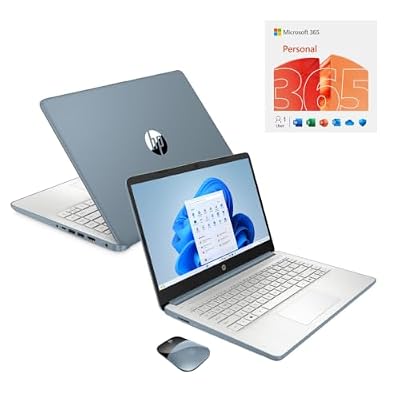
HP 14" HD Touchscreen Notebook Intel N150 4GB RAM 128GB SSD Wireless Mouse + One Year M365 Subscription (Moonlight Blue)
Included for 'Best Touchscreen Laptops Under 500 Dollars: Top Picks' as a relevant option in this category; details come from the product listing.
View on AmazonThe HP 14″ HD Touchscreen Notebook with an Intel N150 is aimed squarely at students and light home users who need a compact Windows machine plus the productivity software to go with it. It bundles a wireless mouse and a one-year Microsoft 365 subscription, which is a meaningful part of the value: the software bundle alone would cost a noticeable amount separately. It suits a first laptop, a secondary machine for a household, or a student whose work is essays, research and video calls.
Key specs as listed
- Display: 14-inch HD touchscreen
- Processor: Intel Processor N150, a 4-core entry-tier chip
- Memory: 4GB RAM
- Storage: 128GB solid-state drive
- Included: wireless mouse and a one-year Microsoft 365 subscription
- Form factor: 14-inch clamshell, portable enough for a backpack
What it does well
The bundle is the story. A one-year Microsoft 365 subscription covers Word, Excel, PowerPoint and Outlook across devices, plus cloud storage, and pairing it with a wireless mouse means the machine is usable the moment it comes out of the box. The Intel N150 is a modern entry-tier chip built on a recent process, so it is more efficient than the older Celeron parts still found in budget laptops, and it handles browsing, documents and streaming video without drama. The 128GB SSD is small by modern standards but still four times the capacity of the 32GB flash drives on the cheapest Chromebooks here, and it is a solid-state drive rather than eMMC, so it responds faster.
The 14-inch size is the practical sweet spot for carrying every day. It fits most backpacks and shoulder bags, weighs noticeably less than a 15.6-inch machine, and the smaller panel means the backlight has less area to illuminate, which generally helps battery life.
Ownership realities
Four gigabytes of RAM is the constraint to plan around. On Windows 11 that is the practical floor: it is fine for a handful of browser tabs plus one document, but it leaves little room for running a video call, a spreadsheet and a dozen tabs at the same time, and the memory is almost certainly soldered, so it cannot be expanded later. Treat this as a two-to-three-application machine and keep the browser tab count modest. Storage is the second constraint: 128GB fills quickly once Microsoft Office is installed, so plan on using cloud storage for documents and photos rather than keeping them locally. The HD panel is also the lowest-resolution class at this size, roughly 112 pixels per inch, so text is visibly less crisp than on a 1080p 14-inch screen.
Pros
- Wireless mouse and a one-year Microsoft 365 subscription included
- Modern, efficient Intel N150 entry-tier processor
- 128GB SSD is four times the capacity of the cheapest budget flash drives
- 14-inch size is genuinely portable for daily carrying
- Windows, so it runs desktop applications rather than web apps only
Cons
- 4GB of RAM is the practical floor and is not upgradeable
- 128GB of storage is tight once Office and updates are installed
- HD resolution on a 14-inch panel looks soft next to 1080p rivals
- Not suited to photo editing, gaming or heavy multitasking
How it compares
Against the HP 14″ Touchscreen with Microsoft 365 and 64GB of eMMC, this model is the better buy for almost everyone: 128GB of SSD storage is double the capacity and a faster drive type, even though the other model carries 8GB of RAM and a premium price tier. Against the Lenovo 2026 Chromebook 14″ WUXGA, the trade-off is software: the Chromebook has a far sharper screen and double the memory, but it runs ChromeOS rather than Windows, so it cannot install desktop Office. Choose this HP if you need real Windows and the Office bundle; choose the Lenovo if you work in a browser.
5. Lenovo 2026 Chromebook 14″ WUXGA Touchscreen – Best Budget Pick for Battery Life and Screen Sharpness
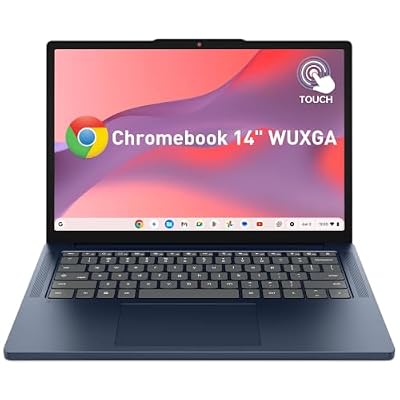
Lenovo 2026 Chromebook 14" WUXGA Touchscreen Student Laptop w/ 8-core CPU
Included for 'Best Touchscreen Laptops Under 500 Dollars: Top Picks' as a relevant option in this category; details come from the product listing.
View on AmazonThe Lenovo 2026 Chromebook 14″ is the best budget pick in this roundup and the right machine for anyone whose work lives in a browser. It combines a WUXGA touchscreen, an 8-core processor and 8GB of RAM, which is an unusual combination at the budget price tier — most cheap Chromebooks cut the screen and the memory before anything else. It suits students, remote workers using web-based tools, and households that want a fast, low-maintenance second computer.
Key specs as listed
- Display: 14-inch WUXGA touchscreen, 1920 × 1200, about 162 pixels per inch
- Processor: 8-core CPU
- Memory: 8GB RAM
- Storage: solid-state storage class (confirm capacity on the listing)
- Operating system: ChromeOS
- Form factor: 14-inch clamshell designed for students
What it does well
The screen is the standout. A 1920 × 1200 panel on a 14-inch laptop works out to roughly 162 pixels per inch, which is sharper than any 15.6-inch 1080p machine here and dramatically sharper than the 1366 × 768 panels common at the budget tier. The 16:10 aspect ratio also gives you about 11 percent more vertical space than a 16:9 panel of the same width, which means more of a document or spreadsheet is visible before you scroll. That is a real productivity difference, not a specification footnote.
Eight gigabytes of RAM combined with an 8-core processor is the other strength. ChromeOS is efficient, and 8GB is enough to keep twenty or more tabs alive without the machine stalling. Because ChromeOS updates itself in the background and boots in seconds, this is a low-maintenance machine for someone who does not want to think about antivirus software or driver updates. Battery life is where a Chromebook usually wins outright: a low-power processor driving a 14-inch panel generally produces runtime measured in a full working day rather than an afternoon.
Ownership realities
The trade-off with ChromeOS is software. Anything that requires a desktop Windows application — full Microsoft Office, specialist accounting or engineering software, most PC games — is out of reach. You can install Android apps and Linux tools, and web versions of Office work well, but this is not a machine for locally installed Windows software. The other thing to check before buying is the auto-update expiry for the specific model, because ChromeOS devices receive updates for a published number of years from their platform launch, and that date determines how long the machine stays secure. Storage in this class is usually soldered, so plan on cloud storage rather than local files.
Pros
- 1920 × 1200 touchscreen at roughly 162 ppi is the sharpest display per dollar here
- 16:10 aspect ratio shows more vertical content than a 16:9 panel
- 8GB of RAM with an 8-core processor is generous for the budget tier
- ChromeOS updates itself and boots in seconds — very low maintenance
- Battery life that generally covers a full working day
Cons
- Cannot run desktop Windows applications
- Local storage is limited and usually soldered
- Software support depends on the published auto-update expiry
- Not suitable for video editing or gaming
How it compares
Against the Lenovo Chromebook 14″ Slim with the MediaTek Kompanio 520, this 2026 model is the better-specified machine: 8GB of RAM and a WUXGA screen beat 4GB and an HD panel, and the price difference between them is usually small. Against the HP 14-inch Chromebook with the Celeron N3350 and 32GB of flash, the gap is enormous — this Lenovo is newer, sharper, better supplied with memory and far better equipped for storage. If you need Windows, look at the HP 14″ N150 notebook instead; if you live in a browser, this is the pick.
6. HP 15.6″ Touchscreen 2026 Edition – Best for a Large Screen Running Windows 11

HP 15.6 Touchscreen Laptop Computer • 2026 Edition • Intel 6 Cores i3 CPU • 8GB RAM • 256GB SSD • Windows 11 with Office 365 for The Web • w/o Mouse
Included for 'Best Touchscreen Laptops Under 500 Dollars: Top Picks' as a relevant option in this category; details come from the product listing.
View on AmazonThe HP 15.6″ Touchscreen 2026 Edition is for buyers who want a full-size Windows 11 laptop with a modern 6-core Intel Core i3 processor, a touchscreen and enough memory to work comfortably. It ships with 8GB of RAM and a 256GB SSD, and it arrives on Windows 11 rather than an older release, which removes the upgrade question entirely. It suits home-office users, students and anyone who wants a big screen and a full keyboard without paying for a convertible they will never fold.
Key specs as listed
- Display: 15.6-inch HD touchscreen
- Processor: Intel 6-core Core i3 CPU
- Memory: 8GB RAM
- Storage: 256GB solid-state drive
- Operating system: Windows 11
- Form factor: 15.6-inch clamshell with a full-size keyboard
What it does well
The 6-core Core i3 is a hybrid design that is a genuine step up from the 2-core chips still shipping in some budget and mid-range machines. Six cores means Windows can spread background tasks — updates, indexing, antivirus scans, cloud sync — across more threads without the machine stuttering while you work. Combined with 8GB of RAM and a 256GB SSD, this is a specification that handles a browser with many tabs, a spreadsheet, a video call and a chat client simultaneously without obvious strain.
Windows 11 out of the box is a practical advantage. It means no upgrade negotiation, no compatibility checks against TPM requirements, and a support runway that extends well into the machine’s useful life. The 15.6-inch chassis brings a full-size keyboard with a numeric keypad, which is a real convenience for anyone entering figures, and the larger body usually means a broader port selection and a bigger battery than a 14-inch equivalent.
Ownership realities
The main compromise here is the display resolution. HD on a 15.6-inch panel works out to roughly 100 pixels per inch, which is the coarsest pixel density in this roundup — text is legible but visibly less sharp than on a 1920 × 1080 panel of the same size, and the difference is obvious when you compare them side by side. If you spend hours reading long documents, that matters. On the positive side, a lower-resolution panel is easier on the battery and less demanding on integrated graphics, so this configuration often delivers better runtime than a 1080p machine with the same battery capacity.
For maintenance, keep the vents clear — a 15.6-inch chassis with a 6-core chip generates more heat than an entry-tier machine, and dust build-up in the intake is the most common reason a laptop starts to feel slower and louder after a year or two. Clean the touchscreen with a dry microfibre cloth and avoid liquid sprays that can seep into the bezel. The battery is the eventual replacement item.
Pros
- Modern 6-core Intel Core i3 handles background tasks well
- Windows 11 pre-installed, with a long support runway
- 15.6-inch keyboard with a numeric keypad
- 8GB of RAM and a 256GB SSD cover everyday work
- Lower-resolution panel helps rather than hurts battery life
Cons
- HD resolution on a 15.6-inch screen is the coarsest here, about 100 ppi
- Premium price tier for a machine with a 256GB drive
- No convertible hinge or tablet mode
- 8GB of RAM is adequate rather than generous
How it compares
Against the Dell 15.6″ with the 13th Gen Core i5, the Dell wins on processor generation, storage capacity and display resolution, and both sit in the premium tier — so the Dell is the stronger buy if the budget stretches. Against the HP 15-inch with the Ryzen 3 3250U, this 2026 Edition is clearly the newer machine: a 6-core chip and Windows 11 out of the box versus a 2-core chip and Windows 10 in S Mode. Against the HP 14″ N150 notebook, this model gives you a bigger screen, double the RAM and a stronger processor for a higher price.
7. Tunhail 10.1″ 2-in-1 – Best for Travel, Reading and Note-Taking

Tunhail 10.1 2 in 1 inch Laptop 12GB RAM 256GB SSD, 360°Flip Touchscreen Laptop with m3-8100Y(Up to 3.40 GH) 800 * 1280 IPS FHD, Backlit Keyboard Laptop Computer for Students/Commuters/Business
Included for 'Best Touchscreen Laptops Under 500 Dollars: Top Picks' as a relevant option in this category; details come from the product listing.
View on AmazonThe Tunhail 10.1″ 2-in-1 is for the buyer who wants the smallest, lightest convertible here — something that goes in a bag without being noticed and works as a tablet on a train, a plane or a sofa. With 12GB of RAM and a 256GB SSD at the budget price tier, it is unusually well supplied for its size. It suits commuters
Related Reviews & Guides





5 Best Cupshe Plus Size Swimwears (2026)

5 Best White Plus Size Leggings (2026)